
The whole term on one page
One term calendar that pulls everything together — weekly themes, Power of One, presenters, education slots, birthdays and socials — ready to share or print.
Used by: President, whole Leadership Team, all members (view)
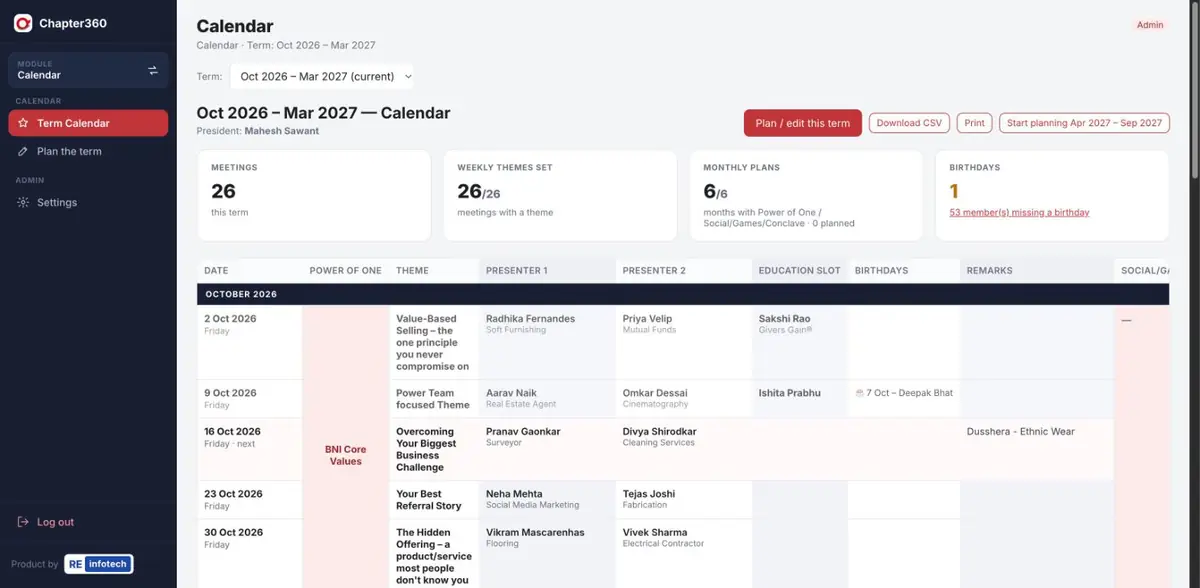
What Calendar does
The Calendar replaces the chapter's old planning spreadsheet — and stays in sync with the other modules.
Screenshots use sample data — member names, companies, phone numbers and amounts are illustrative.
How it works
- Create the termThe President sets the term dates and the meeting day.
- Add themes & plansWeekly themes, Power of One and socials for each month.
- Let the modules fill inPresenters and education slots appear as they are planned.
- Share itMembers see the calendar; download or print it any time.
Calendar: common questions
What does the Chapter360 term calendar include?
Every weekly meeting in the term with its theme, the month’s Power of One, both presenters, the education slot, birthdays, remarks and any Social, Games or Conclave plans.
Do we have to type presenters into the calendar?
No. Presenters come from the Presentations module and education slots from the Education Slots module automatically.
Can we print or export the calendar?
Yes. Download it as a CSV file or print it straight from the browser.
See it running for your chapter
Book a free demo with the RE Infotech team.